


Orqra is a local-first desktop app for AI creation.
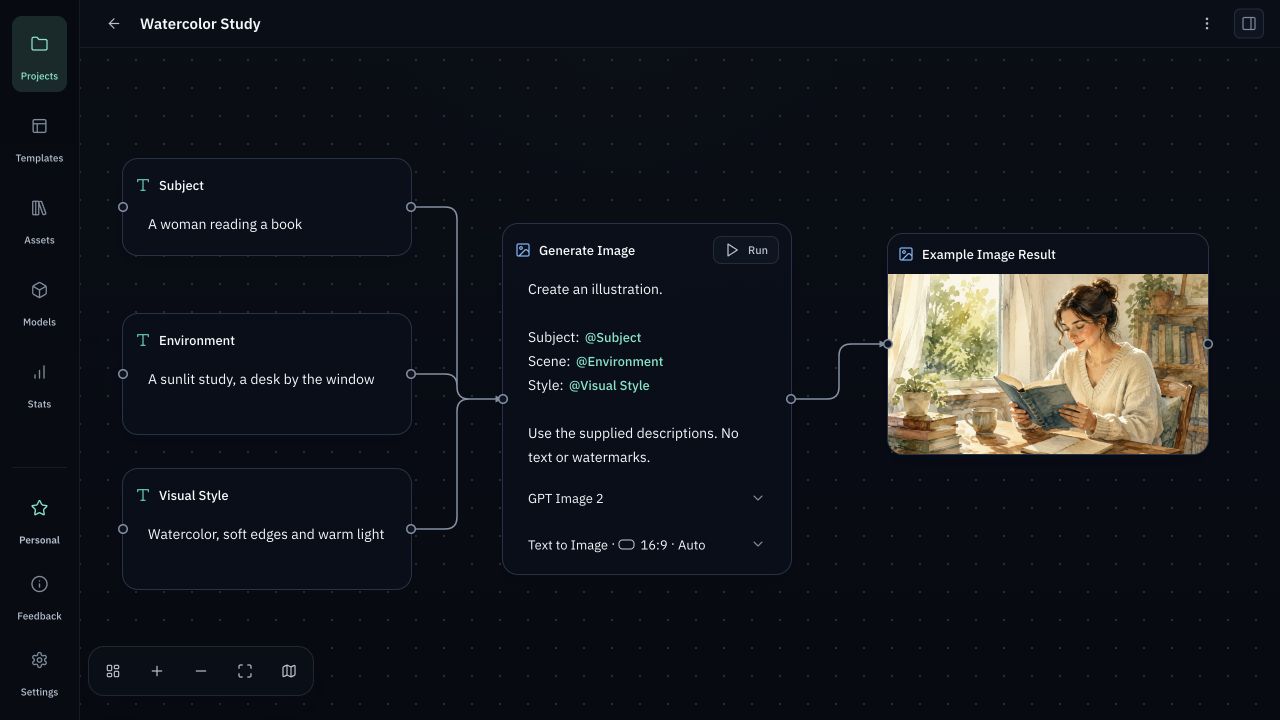
Connect AI models to create text, images, videos and audio. Save prompts, assets and creative steps on your computer to use again.
Use your own OpenRouter API Key to connect AI models. Generating content sends the required inputs to model providers. Pay OpenRouter directly for model usage; Orqra adds no markup.
Currently in private beta. Public purchases and downloads are not open yet.
- AI text generation and editing
- Write, rewrite, summarize and translate.
- AI image generation
- Create images from text or reference images.
- AI video generation
- Turn text or images into video.
- AI audio generation
- Turn written content into speech and voiceovers.
Supported models
Use your own OpenRouter API Key to access the models below. Pay OpenRouter directly for model usage.
View all modelsText
- GPT-6 Astra
- Claude Fable 5.1
- Gemini 3.8 Flash


Image
- GPT Image 2.5 Sunburst
- Nano Banana Pro
- FLUX.2 Max


Video
- Veo 3.1
- Seedance 2.5
- MiniMax H3


Audio
- MiniMax Speech 2.8 HD
- MiniMax Speech 2.8 Turbo
Orqra Prompt Fabric
Clearer prompt structure. Reusable creative content.
Manage characters, scenes and styles separately from task instructions. Combine them using templates, with less repetitive writing.
Clear structure
Keep creative content and instructions separate so they are easier to read and edit.
Combine as needed
Use templates to reuse and combine creative content and instructions as needed, with less repetitive writing.
Save and reuse
Save frequently used creative content and instructions as templates. Insert and edit them for your next task.
For example: save a character description and visual style as templates. Next time, insert them, change the scene and adjust the task instructions before creating again.
Compose prompts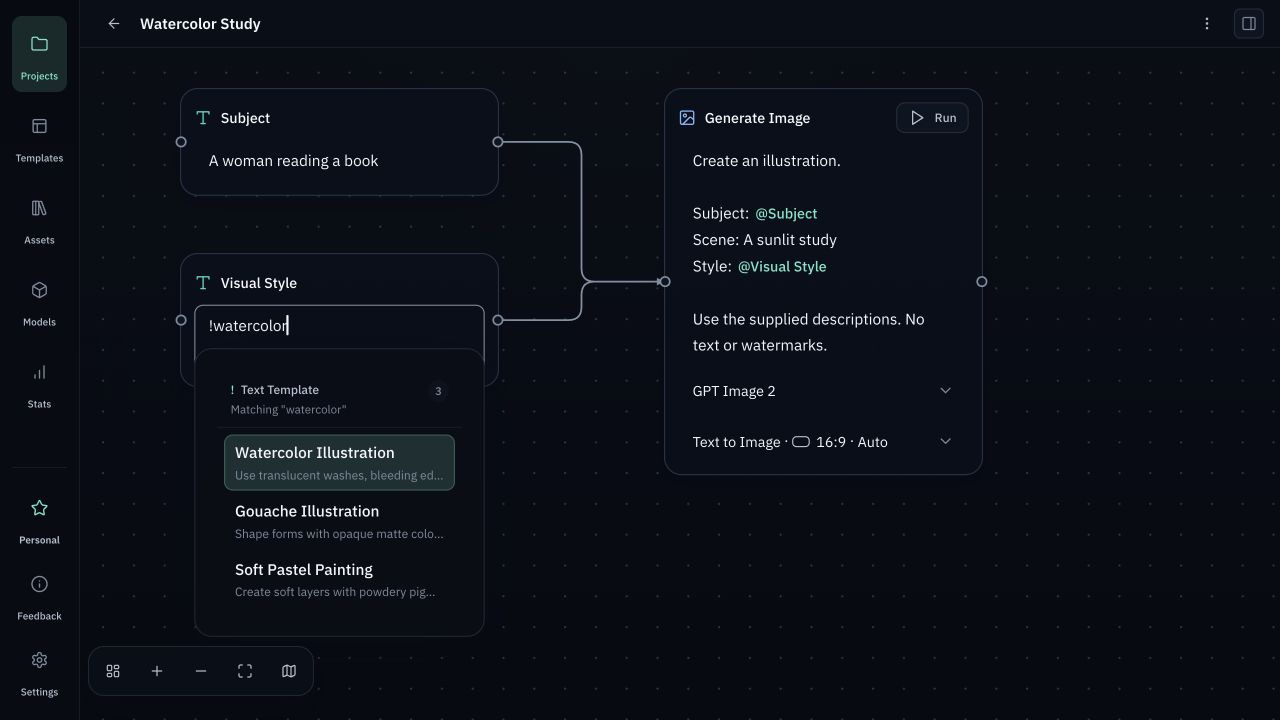
Why Orqra
Choose your models. Build on your own creative work.
Pay model providers directly, with no extra markup from Orqra. Keep assets on your computer and save, reuse, and improve your prompts and workflows, so each project gives you something to build on.
Connect the models you choose
Connect leading AI models supported by Orqra and choose text, image, video and audio models for your creative needs.
No extra markup on model usage
Pay OpenRouter directly for model usage, according to its pricing and terms. Orqra does not resell model credits or mark up model usage.
Keep control of your creative assets
Projects, assets, and generated results stay on your computer for you to organize and manage; they are not uploaded to Orqra servers. When you generate, the required inputs are sent to the model service you connect.
Build your own creative process
Save prompts, model settings, and workflows that work for you as templates. Reuse, adjust, and improve them on your next project to develop your own creative process.
Workflow
From inputs to results, build a workflow you can reuse.
Prepare your materials, write instructions, and run the model. Save what works as templates for your next creation.
#1
Add your materials
Enter text or add images and videos. You can type ! to insert a text template, then edit it as needed.
#2
Write instructions
Describe what you want the model to do, or type ! to insert an instruction template and adapt it to your task.
#3
Run and view results
Choose a model and run it. Review the results, then adjust your materials and instructions as needed.
#4
Save templates for reuse
Save useful text, instructions, or the entire workflow as templates. Insert and edit them for your next creation.
Free & Personal
Orqra Free & Personal
Free includes the full workflow. Explore Personal when you need more projects, templates and enabled models.
Orqra Free
$0
Up to 2 projects, 10 personal templates and 3 enabled models.
Orqra Personal License
$79
One-time payment. Keep using eligible versions permanently; includes 12 months of updates and 2 device activations.
Model usage
Billed separately
Model credits are not included. Use your own API Key; usage is billed separately.
Planned pricing. Public purchases and downloads remain closed during private beta.
PricingFAQ
Common questions
Where does my content go?
Projects and artwork are stored on your computer by default. Generation sends selected content to model services; some local video reference images also need your own cloud storage. See Data storage and privacy for details.
How are Free and Personal different?
Free and Personal include the same full workflow. Personal removes the limits on projects, personal templates and enabled models; see Pricing for the full terms.
Can I keep using Personal after the update period?
Yes. Personal includes 12 months of updates. You can keep using eligible versions released during that period; your software usage rights do not expire with it. Later versions require the corresponding update entitlement.
What do I need to get started?
You need the Orqra installer and your own OpenRouter account and API Key. Public downloads are not open yet. If you have a private beta build, follow Model setup to set up your connection, then Quick start to create your first image. You do not need to buy Personal or set up video reference storage first.