Skip to content
Orqra
Browse documentation

Prompt Fabric

Orqra Prompt Fabric

Turn prompts into manageable creative assets instead of copying them between chats, documents, and model consoles.

What you will complete

Templates, prompts, project inputs, and run facts remain inside the local-first workspace.

In this guide

  1. 1
    Three template roles — Keep reusable text context, task instructions, and optional system prompts in distinct template types.
  2. 2
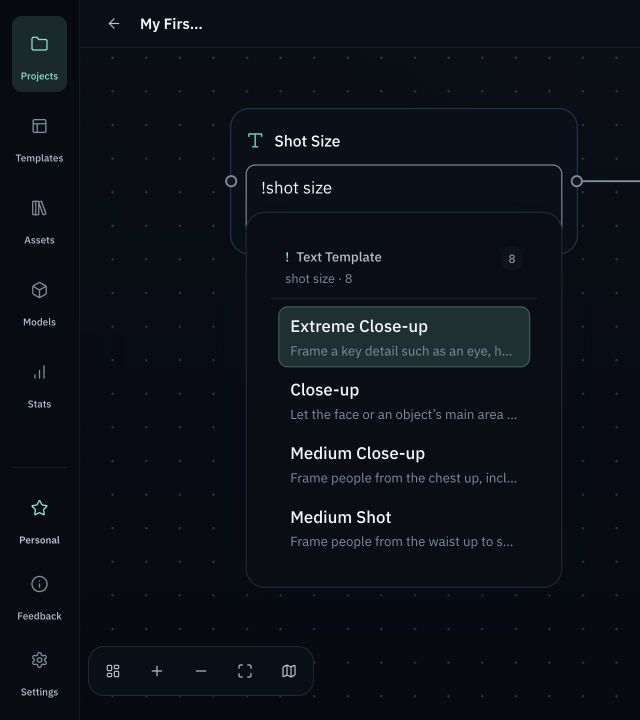
    Fast, editable insertion — Use ! to copy a matching template into a field. Inserted content remains editable and does not silently change later.
  3. 3
    Inspect before running — Request Preview separates the system prompt, task instruction, resolved inputs, final user input, model, and key parameters.
Orqra template library showing a reusable storyboard visual-consistency project template
Real Prompt Fabric interfaceThe Orqra template library with a locally created demo project template.

Before you start

  • Start without an account or License, keep projects and workflow data on the device, and connect a model provider only when you choose.
  • Your API Key is stored locally. Never send it to Orqra support or enter it on the Orqra website.
  • Keep reusable text context, task instructions, and optional system prompts in distinct template types.

Complete the task

  1. 1

    Templates

    Orqra Prompt Fabric

    Turn prompts into manageable creative assets instead of copying them between chats, documents, and model consoles.

    Expected result

    The template library is open and ready for a reusable prompt asset.

  2. 2

    Text / Instruction / System Prompt

    Three template roles

    Keep reusable text context, task instructions, and optional system prompts in distinct template types.

    Expected result

    The content is stored in the template role that matches data, a task instruction, or an optional system prompt.

  3. 3

    !

    Fast, editable insertion

    Use ! to copy a matching template into a field. Inserted content remains editable and does not silently change later.

    Expected result

    Typing ! shows only compatible templates for the current field and copies the selected content into it.

  4. 4

    Inserted content

    Write once, manage structurally, reuse everywhere.

    Use ! to copy a matching template into a field. Inserted content remains editable and does not silently change later. Templates, prompts, project inputs, and run facts remain inside the local-first workspace.

    Expected result

    The inserted text can be edited, and later template changes do not silently rewrite it.

  5. 5

    Request Preview

    Inspect before running

    Request Preview separates the system prompt, task instruction, resolved inputs, final user input, model, and key parameters.

    Expected result

    Request Preview separates the system prompt, instruction, resolved inputs, model, and key parameters.

  6. 6

    Run snapshot

    A real local-first Free workspace

    Templates, prompts, project inputs, and run facts remain inside the local-first workspace. The workspace is local-first and BYOK. Model requests follow the Provider connection you configure.

    Expected result

    The run snapshot records what was actually sent while templates, prompts, and run facts remain local-first.

Checks before you retry

  • Keep reusable text context, task instructions, and optional system prompts in distinct template types.
  • Use ! to copy a matching template into a field. Inserted content remains editable and does not silently change later.
  • Request Preview separates the system prompt, task instruction, resolved inputs, final user input, model, and key parameters.