ข้ามไปยังเนื้อหา
Orqra
เรียกดูเอกสาร

เวิร์กโฟลว์

สร้างเวิร์กโฟลว์ที่ใช้ซ้ำได้ครั้งแรก

A reusable creative pipeline keeps the structure of the work visible: what goes in, how it is processed, what comes out, and which preset should run next.

สิ่งที่คุณจะทำเสร็จ

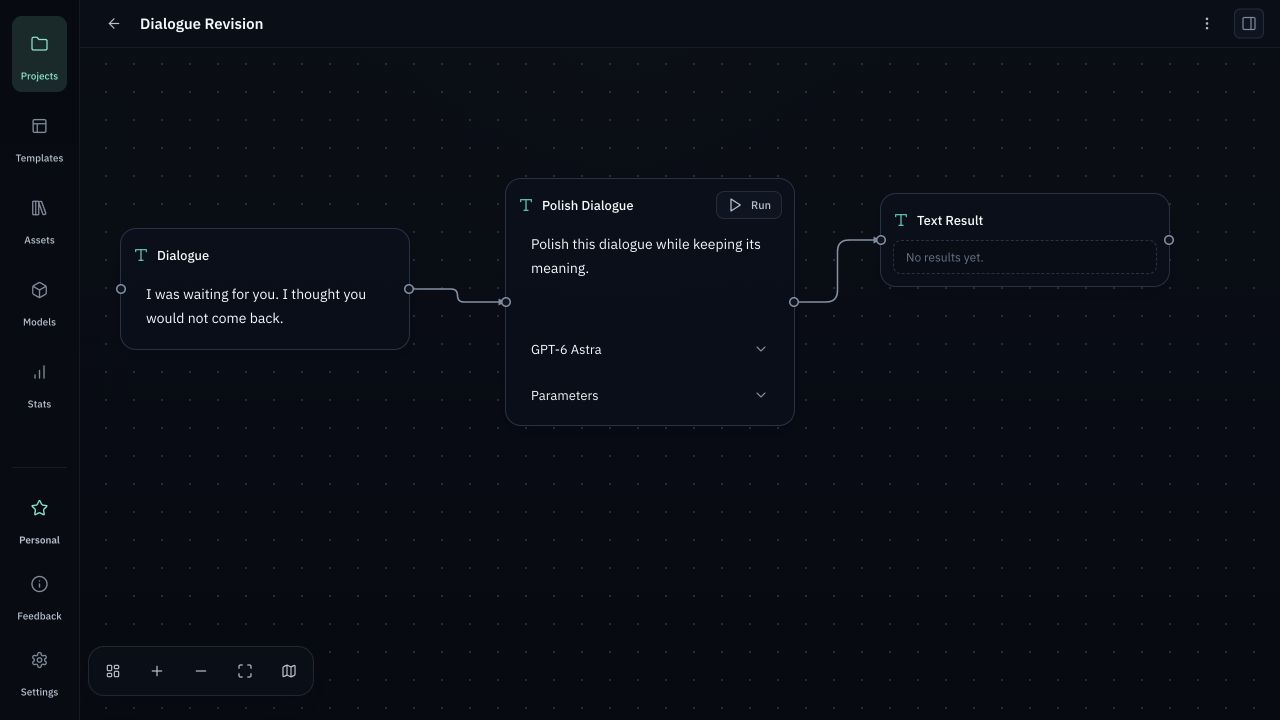
เพิ่มโหนดอินพุตและประมวลผล เชื่อมโฟลว์ และเลือกโมเดลที่ต้องใช้

ในคู่มือนี้

  1. 1
    เชื่อมต่อ Provider — ใน Models เพิ่มข้อมูลของคุณ เลือกโมเดล บันทึก และทดสอบการเชื่อมต่อ
  2. 2
    สร้างโครงการ — เพิ่มโหนดอินพุตและประมวลผล เชื่อมโฟลว์ และเลือกโมเดลที่ต้องใช้
  3. 3
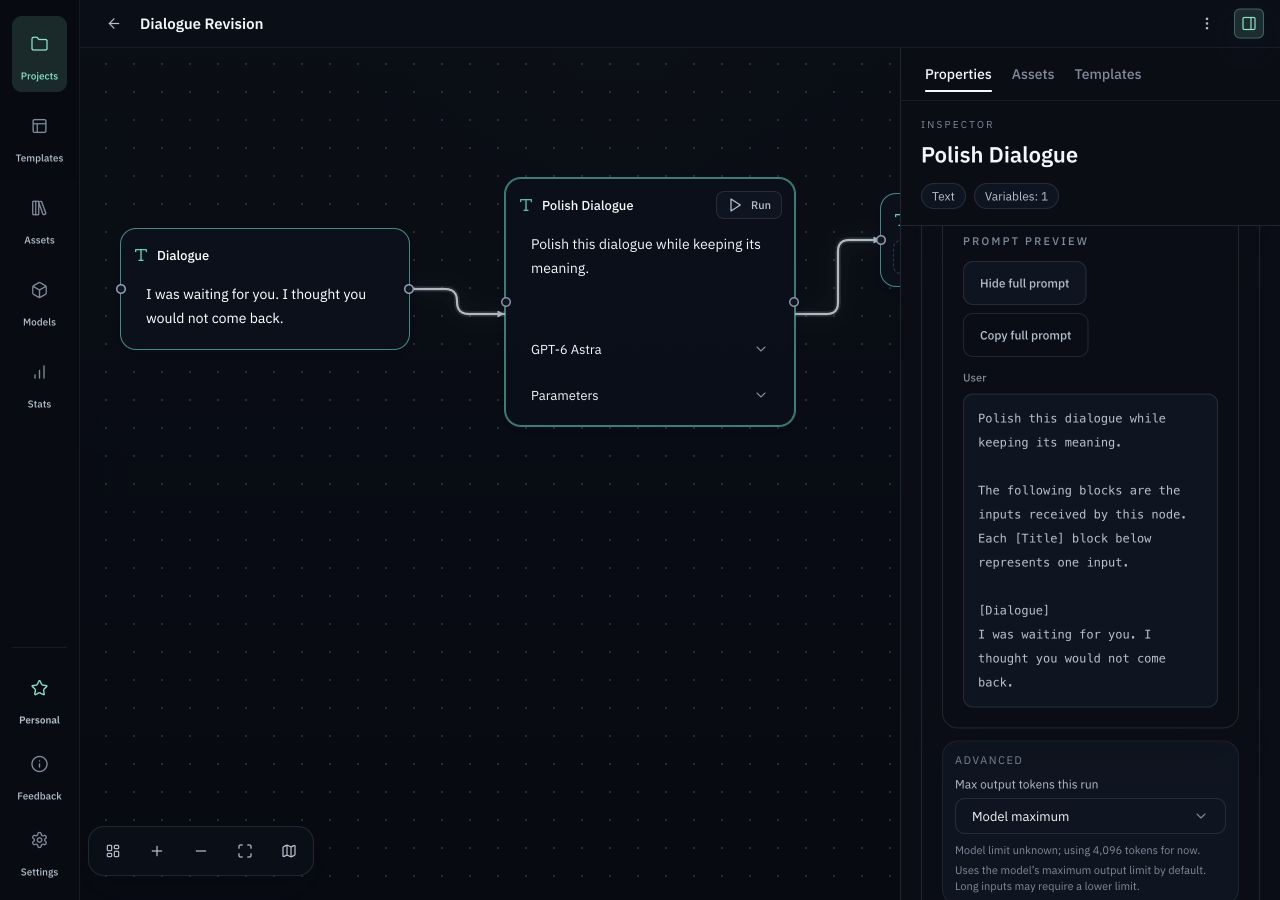
    ตรวจสอบและรัน — แทรกเทมเพลต ตรวจ Request Preview และรันเมื่ออินพุต โมเดล และพารามิเตอร์ถูกต้อง
Define the model, prompt structure, transformation rules, and expected output format.
Processing nodeDefine the model, prompt structure, transformation rules, and expected output format.
แทรกเทมเพลต ตรวจ Request Preview และรันเมื่ออินพุต โมเดล และพารามิเตอร์ถูกต้อง
ตรวจสอบและรันแทรกเทมเพลต ตรวจ Request Preview และรันเมื่ออินพุต โมเดล และพารามิเตอร์ถูกต้อง

ก่อนเริ่มต้น

  • หลังติดตั้งบิลด์ที่ตรวจสอบแล้ว ให้เปิด Orqra โดย Free ไม่ต้องมีบัญชีหรือ License
  • ใน Models เพิ่มข้อมูลของคุณ เลือกโมเดล บันทึก และทดสอบการเชื่อมต่อ
  • ความพร้อมใช้งาน ความสามารถ ขีดจำกัด และค่าบริการกำหนดโดย Provider โดย Orqra ไม่มีเครดิต AI รวมอยู่ด้วย

ทำงานให้เสร็จ

  1. 1

    Projects

    สร้างโครงการ

    เพิ่มโหนดอินพุตและประมวลผล เชื่อมโฟลว์ และเลือกโมเดลที่ต้องใช้

    ผลลัพธ์ที่คาดหวัง

    เพิ่มโหนดอินพุตและประมวลผล เชื่อมโฟลว์ และเลือกโมเดลที่ต้องใช้

  2. 2

    Add node

    Input node

    Collect scripts, references, prompts, assets, and project context before a run starts.

    ผลลัพธ์ที่คาดหวัง

    Collect scripts, references, prompts, assets, and project context before a run starts.

  3. 3

    Input node

    Processing node

    Define the model, prompt structure, transformation rules, and expected output format.

    ผลลัพธ์ที่คาดหวัง

    Define the model, prompt structure, transformation rules, and expected output format.

  4. 4

    Processing node

    Output node

    Keep generated scenes, shot prompts, notes, and release tasks attached to the project.

    ผลลัพธ์ที่คาดหวัง

    Keep generated scenes, shot prompts, notes, and release tasks attached to the project.

  5. 5

    Output node

    ตรวจสอบและรัน

    แทรกเทมเพลต ตรวจ Request Preview และรันเมื่ออินพุต โมเดล และพารามิเตอร์ถูกต้อง

    ผลลัพธ์ที่คาดหวัง

    แทรกเทมเพลต ตรวจ Request Preview และรันเมื่ออินพุต โมเดล และพารามิเตอร์ถูกต้อง

  6. 6

    Request Preview / Run

    Reusable preset

    Save the setup so the same creative process can be repeated, reviewed, and improved.

    ผลลัพธ์ที่คาดหวัง

    Save the setup so the same creative process can be repeated, reviewed, and improved.

ตรวจสอบก่อนลองใหม่

  • การสร้างหรือแก้ไขโครงการ โหนด และเทมเพลตอย่างเดียวจะไม่เรียก Provider
  • การทดสอบการเชื่อมต่อและซิงค์โมเดลเป็นการทำงานเครือข่ายแยกกัน Prompt และอินพุตจะถูกส่งเมื่อคุณสั่งเรียกใช้ขั้นตอนโมเดลเท่านั้น
  • Support ไม่ต้องการให้ upload โปรเจกต์ Prompt ผลลัพธ์ ไฟล์ local หรือ API Key ไปยัง Orqra